


Free timesheets, built from your Outlook & Google calendar
The timesheet app so simple your whole team will actually keep it up to date. Use it on your own, or roll it out across the firm.
Free on your own. No credit card needed.

What is a calendar timesheet?
A calendar timesheet is a timesheet built from the events already in your calendar, rather than one you type into a blank grid from memory.
VibaCloud reads the meetings, calls and appointments in your Microsoft Outlook and Google calendars, then turns each one into a line on your weekly timesheet. You tag every entry to a client, project and task, mark what's billable, and your hours and totals add up automatically. The result is an accurate record of where your time actually went, in minutes rather than a Friday afternoon of guesswork.
It works the same way for a whole firm. Everyone's week builds itself from their own calendar against a client list you share once, and submitted weeks land with an admin to approve, so nobody spends Monday morning chasing five people for last week's hours.
Here's what that looks like
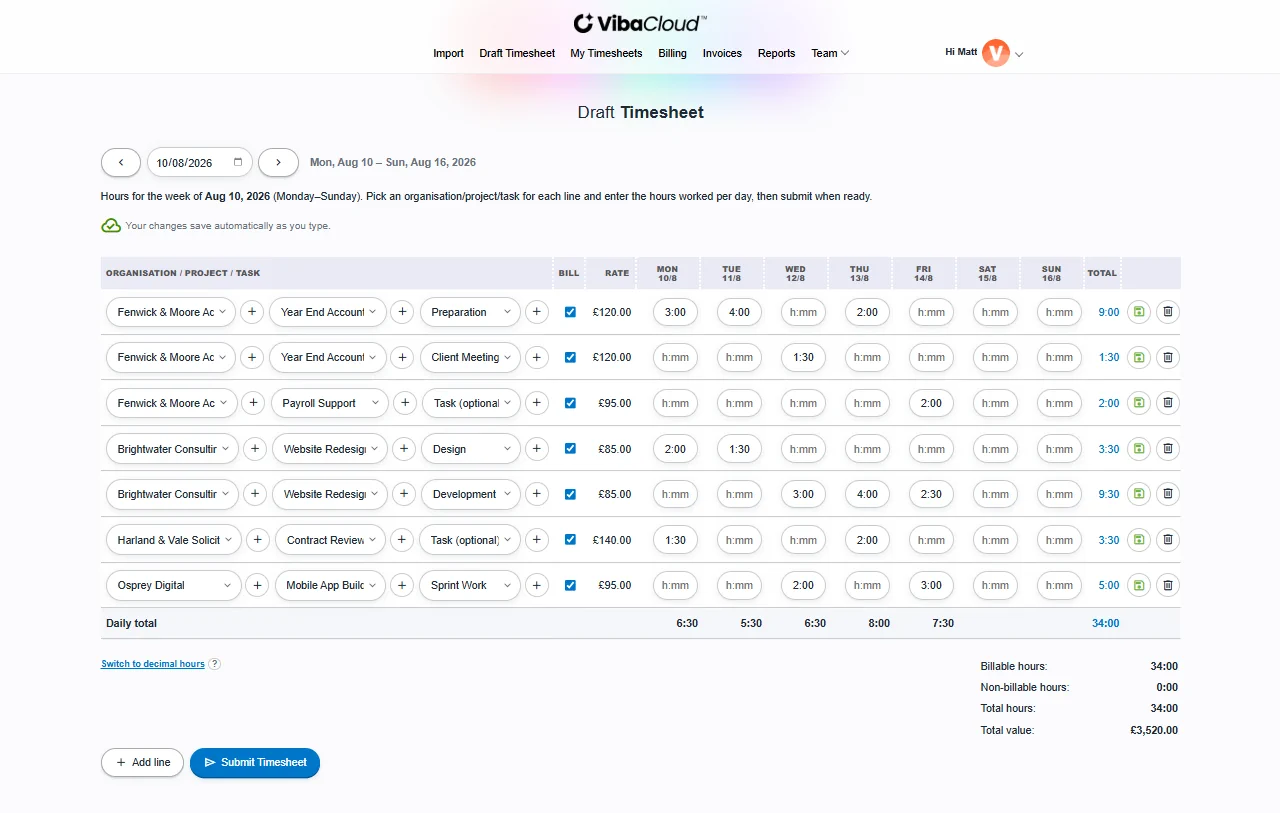
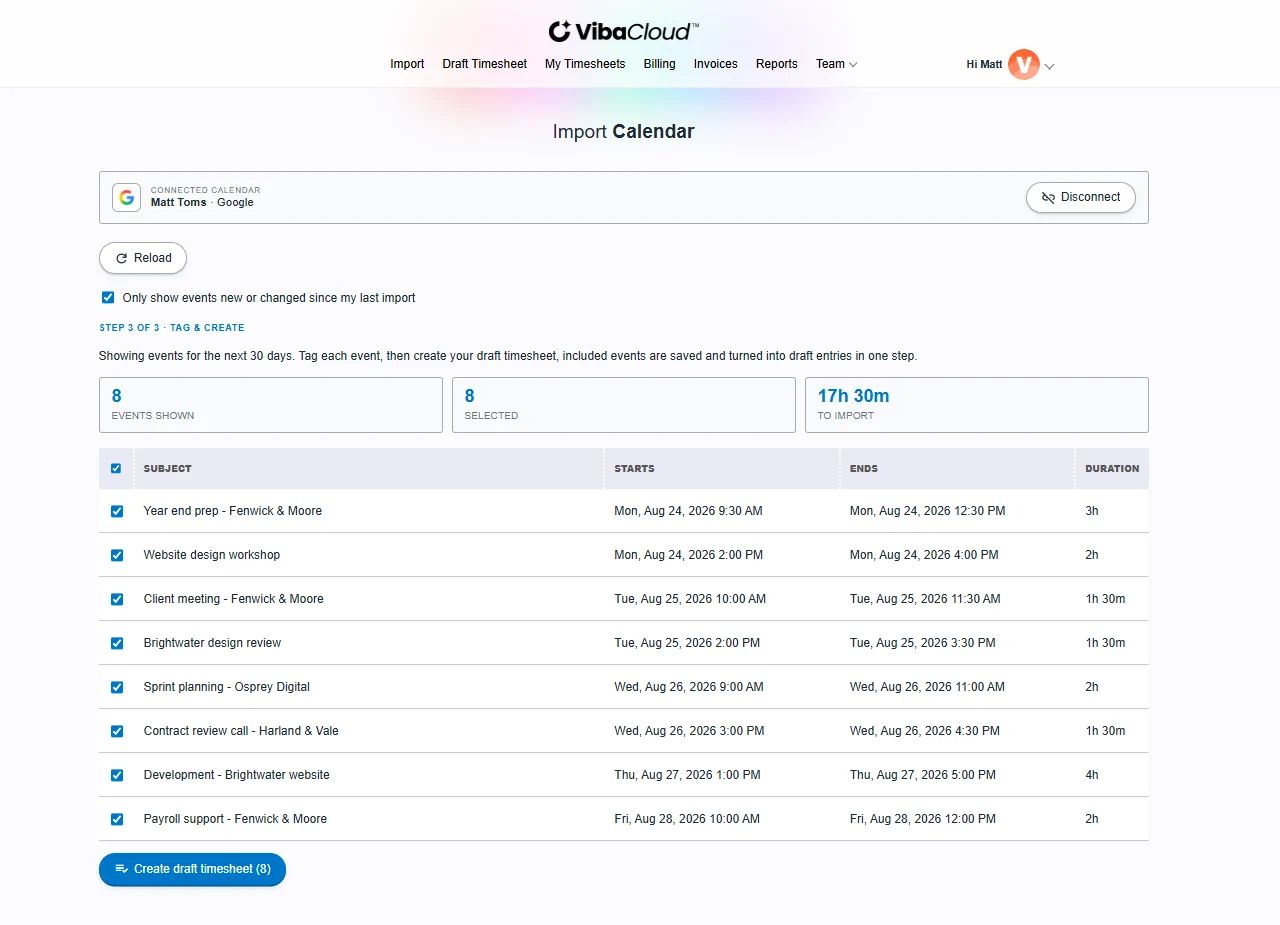
Calendar events in, a finished week out: every line tagged, hours and value totting up as you go.
Stupidly
simple
Everyone knows timesheets are dull. So we made filling them in the least painful part of your week.
Your calendar already knows what you did. VibaCloud pulls your meetings and events straight from Outlook and Google, lets you tag each one with a project in a couple of clicks, and turns the whole lot into a draft timesheet in one go.
No blank grids. No "what did I even do on Tuesday?" Just confirm, tweak, and submit. And if there's a team of you, everyone works this way against the same client list, so the hours that reach the invoice actually add up.
Free on your own. No credit card needed.
Three steps. That's the whole thing.
- 01
Import
Pull your week straight from your Outlook and Google calendars: meetings, events, the lot.
- 02
Tag
Drop each event onto a project and flag whether it's billable. A couple of clicks per row.
- 03
Done
Your draft timesheet builds itself. Review the week, submit, and get on with your day.
No Outlook or Google calendar? You can build a timesheet entirely by hand. Just add your time manually and skip the import.
For firms
Still chasing five people for last week's hours?
Small practices lose billable time every week to work nobody got round to writing down. Create a team, invite your colleagues, and everyone's week arrives already filled in from their own calendar.
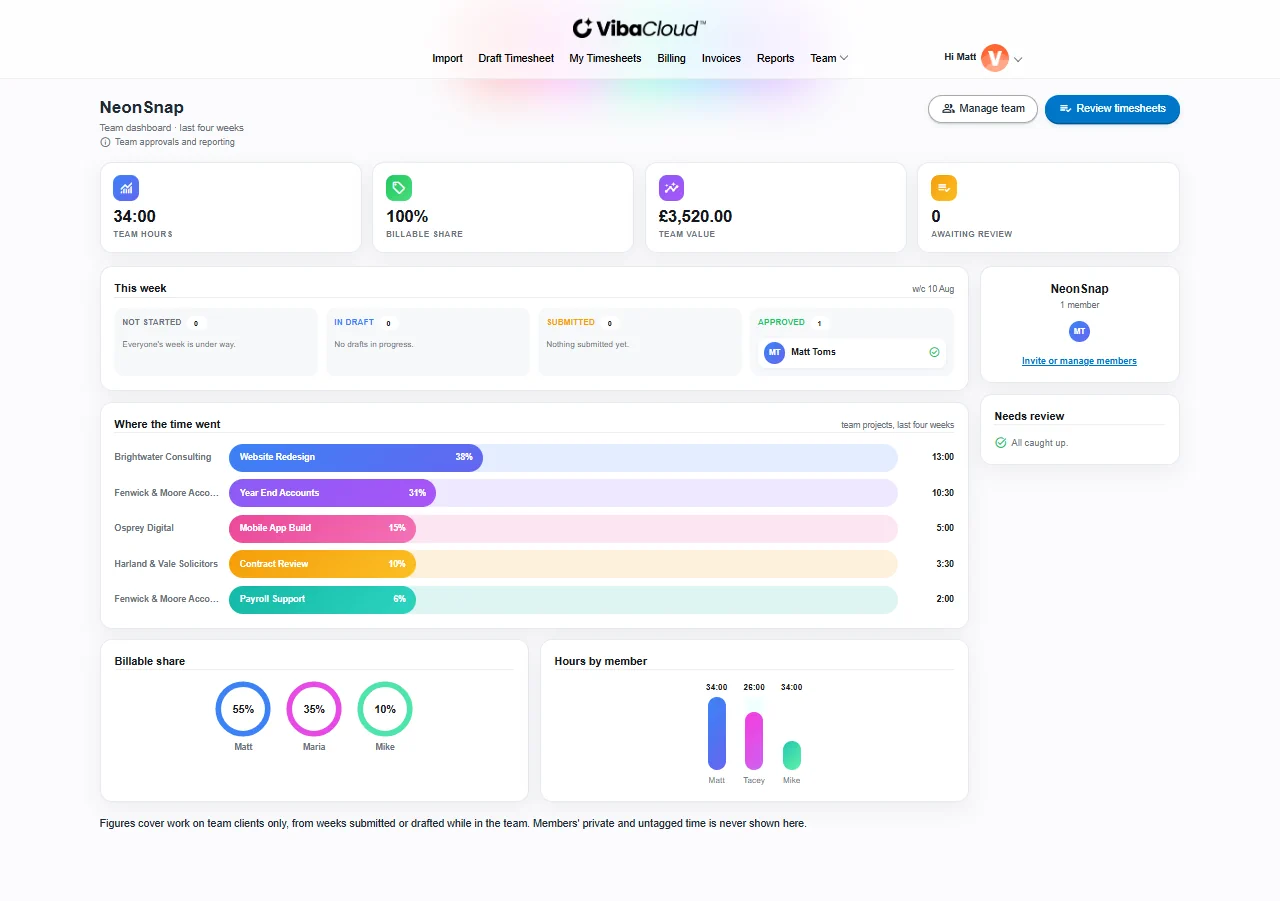
One shared client list
Share your clients and projects with the team, so everyone tags time against the same list and every project bills at the same rate.
The whole team in one view
See who has submitted, who hasn't, and what they worked on, week by week. No spreadsheets doing the rounds by email.
Submit, approve, done
Your people submit their week, you approve it or send it back with a comment saying what to fix. Everyone gets an email, so nobody needs nagging.
Export approved time
Pull the team's approved hours out by member, client or project, with the entry level detail alongside, ready for invoicing or payroll.
Personal time stays personal. Only the work your people tag to a shared client is ever visible to the team.
Free trial. No card to get started.
So what does it actually do?
Filling in the week
Your calendar, imported
Meetings and events come straight from Outlook and Google, so the week arrives mostly written.
It learns how you tag
Tag the Henderson call once and the next one turns up already on the Henderson project. On by default, off in settings if you'd rather do it yourself.
Saves as you type
Every change is stored as you make it, so there's no Save button to hunt for.
What the week is worth
A rate per project
Set it once and every hour tagged to that project carries it.
Billable is a checkbox
Non-billable work still gets recorded, it just comes out at zero.
Submitted weeks stay put
Change a rate next month and last month's timesheet doesn't quietly change with it.
Getting paid
Invoices from hours you've already submitted
Pick a client and a period, and the billable work becomes an invoice, one line per project.
VAT, discounts and your own numbering
Charge tax on top or show it included, take a percentage or a flat amount off before the tax is worked out, and set your own prefix and starting number.
Send it, then chase it
Email the PDF with replies coming back to you, and switch on automatic reminders for the ones that go quiet.
Where you stand
The money, by stage
What's waiting on approval, what's ready to bill, what's invoiced, and what's actually been paid.
Calendar against billed
How much of what sat in your calendar made it onto a timesheet. The gap is usually the interesting bit.
Everything exports to Excel
Timesheets, billing reports and the team export.
That's the short version. See everything VibaCloud does, including team accounts, currencies and the free tools.
Built for people who bill by the hour
Freelancers and contractors. Turn the calls and meetings already in your calendar into billable hours, so you invoice for everything you actually did and nothing slips through the cracks.
Consultants and agencies. Track time across every client, project and task in one weekly view. Flag what's billable, watch your totals build as you go, and submit a tidy timesheet each week.
Small firms and practices. Accountants, solicitors, surveyors and consultancies of five to fifteen people. Give everyone the same client list, collect the week from their calendars, and approve it in one place instead of chasing it.
Professional services teams. Designers, developers, accountants and lawyers: anyone who reports time by project. Keep weekly timesheets accurate without losing your Friday afternoon to admin.
Free download
Prefer a spreadsheet? Take our free timesheet template
Our free weekly timesheet template for Excel and Google Sheets goes beyond the usual grid: rates, a billable column and your weekly total are built in. No email address to hand over, no watermark, and the article walks you through the formulas most templates get wrong.
Get the free template
Free tool
Need an invoice right now?
Our free invoice generator creates a professional PDF invoice in your browser. Add your details and line items, apply VAT if you're registered, and download it in a minute or two. No sign-up, no watermark, and nothing you type is stored.
Create a free invoice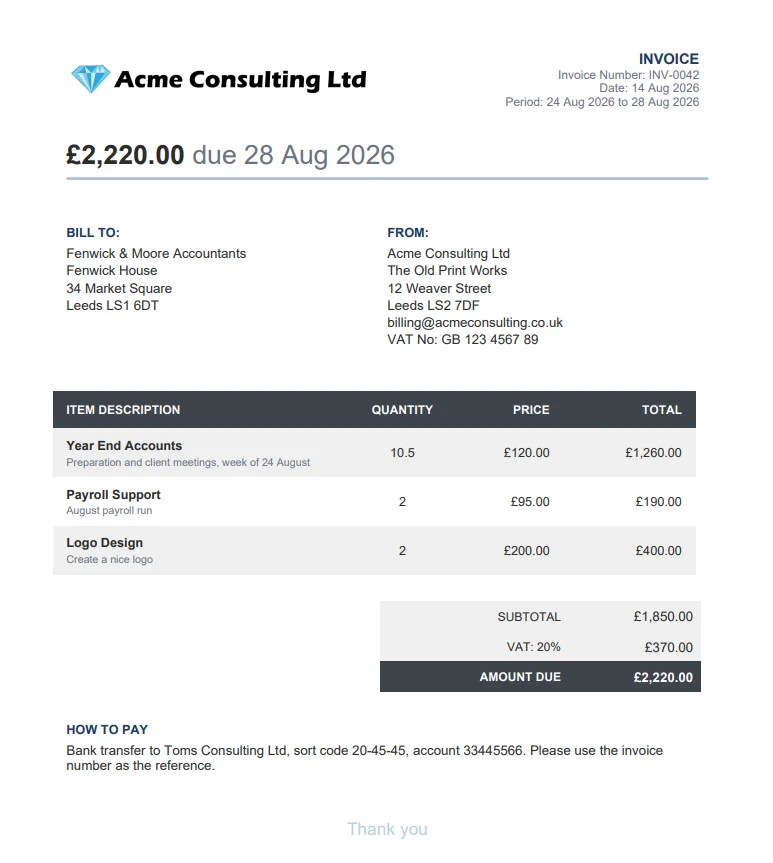

Latest from the blog
How to Invoice as a Sole Trader in the UK: What HMRC Actually Requires
There is no official HMRC invoice template, and the legal minimum is shorter than you'd think. What has to be on the page, the address rule if you use a trading name, the rolling £90,000 VAT line, and what April 2026 changed.
Read the articleTimesheet FAQs
What is VibaCloud?
VibaCloud is a calendar based timesheet app. It connects to your Microsoft Outlook and Google calendars, turns the meetings and events already there into a draft weekly timesheet, and lets you tag each one to a client, project and task. You confirm your hours, flag what's billable, and submit. Use it on your own, or set up a team so a whole firm works from one shared client list with approvals. New here? Start with our getting started guide.
Who is VibaCloud for?
Anyone who accounts for their time by project or client, whether that's one person or a whole practice: freelancers, contractors, consultants, agencies, and small professional services firms such as accountants, solicitors, designers and developers. If you bill by the hour, or you chase colleagues for their hours every week, it's built for you.
Can my whole company use VibaCloud?
Yes. Create a team, invite your colleagues by email, and share your clients and projects so everyone tags their time against the same list. Each person's week still builds itself from their own calendar, and admins get a single view of who has submitted what. Start on the team page.
Can managers approve timesheets?
Yes. Team members submit their week, then a team admin approves it or sends it back with a comment explaining what needs fixing. The member sees that comment on their draft and resubmits. Approved time can be exported for the whole team, summarised by member, client or project, with entry level detail alongside it.
Does my team see all of my time?
No. Only work you have tagged to a client or project shared with the team is visible to your admins. Anything untagged, or tagged to a client of your own, stays private, as do your imported calendar events.
Is VibaCloud free?
Using VibaCloud on your own is completely free: connect your Outlook or Google calendar (or add time by hand), then build and submit your timesheets without paying or entering any card details. Team accounts, which add the shared client list, the manager view, approvals and the consolidated export, are a paid plan for firms with a free trial to start.
Do I have to start from a blank timesheet?
Never. VibaCloud imports the events already in your Outlook and Google calendars, so your week is mostly filled in before you've typed a thing. You just confirm and tidy up. Here's how a timesheet builds from your calendar.
Which calendars can I connect?
Microsoft (Outlook) and Google. Connect either or both, and you can link a second account later and it'll sit alongside the first under the same login.
Can I try VibaCloud without creating an account?
Yes. You can start building a timesheet as a guest, without signing up. When you're ready to save it, create an account and your entries carry over exactly as they are.
Can I use VibaCloud without a calendar, or add time by hand?
Yes to both. You don't need a connected calendar at all: the Draft Timesheet screen lets you add entries by hand, so you can build a whole timesheet from scratch, or top up an imported week with anything you didn't book as a meeting. Learn how to track time manually.
Can I track time for more than one client?
Yes. Time is organised by Organisation, Project and Task, so you can keep separate clients and their projects side by side and still see one weekly total. Each project carries its own billable setting and hourly rate.
How do projects and billable hours work?
Every entry is tagged with an Organisation and Project (and optionally a Task), plus a billable flag. VibaCloud totals your hours and value for the week automatically as you go.
Can I export my timesheet to Excel?
Yes. Any week can be exported to an Excel spreadsheet or printed to save as a PDF, so it's easy to attach to an invoice or hand to payroll. Every past week stays available under My Timesheets.
Can I change a timesheet after I've submitted it?
Submitting locks the week so the numbers stay trustworthy, and entries become read-only. If something needs fixing, just reopen it: that unlocks the week for editing and resubmitting, and each reopen is tracked so there's always a clear audit trail. You can also view or print any past week from My Timesheets at any time.
Is my data private?
Your timesheets, calendar events and projects are scoped to your account. On a solo account you only ever see your own data. In a team, your admins see the time you have tagged to shared clients once you submit it, and nothing else: your calendar events and any private work stay yours. Calendar access is read-only and used purely to build your drafts.
Make peace with your timesheet.
It takes minutes, not Friday afternoons. On your own or across the firm.
Get started for freeFree on your own, and no credit card to try it with your team.